


In This Article
The short version
- Clean up in the right order: data, structure, automation, then reporting.
- Fix the source of mess (forms, imports, integrations), not just the symptoms.
- Document as you go so the portal doesn't drift back.
Every portal gets messy. Teams grow, people leave, integrations get added, and nobody owns the cleanup. The good news: you can make real progress in 30 days if you go in the right order.
Week 1: Data
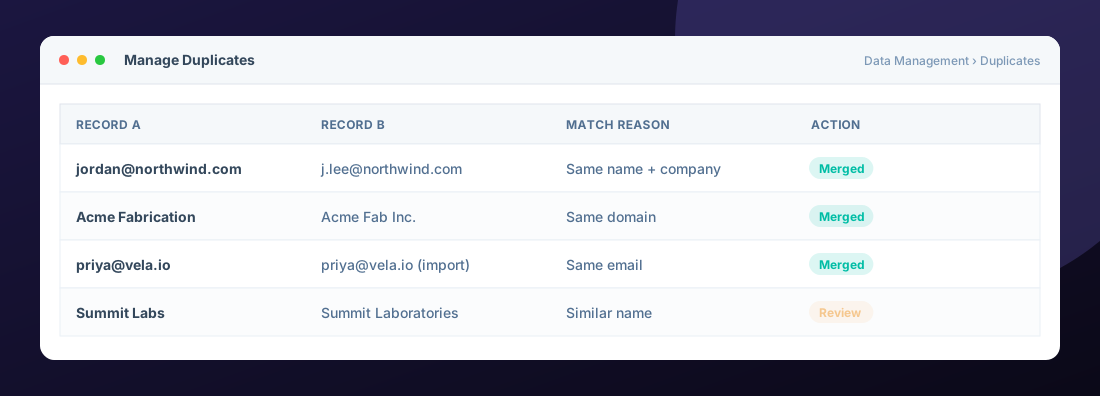
- Run duplicate management for contacts and companies.
- Find contacts with no email, no owner, or no lifecycle stage.
- Check the data quality tools for formatting issues and property anomalies.
- Find where bad data enters: a form, an import, or an integration.
Week 2: Structure
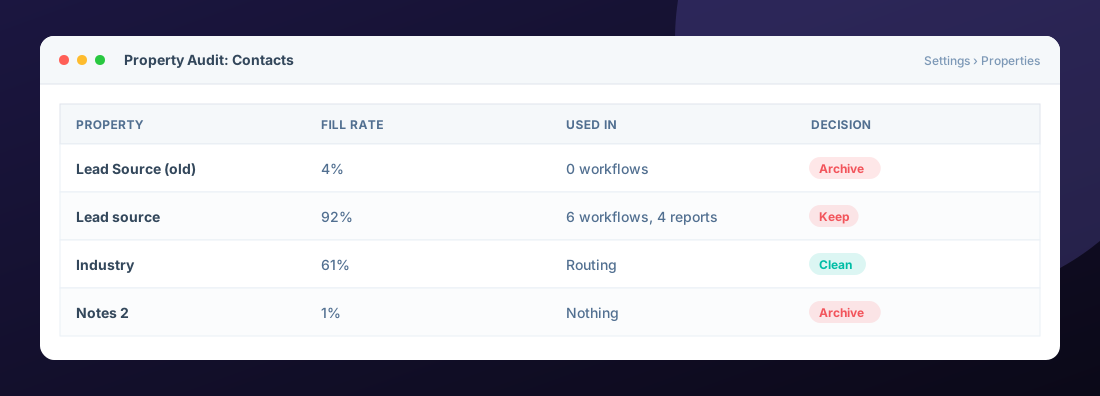
- Audit properties. Archive anything with a near-zero fill rate that isn't used in workflows, lists, or reports.
- Confirm lifecycle stage definitions with sales and marketing, then fix records that skipped or stalled.
- Review pipelines and deal stages. Every stage should have clear exit criteria.
Week 3: Automation
- List every active workflow, what it does, and who owns it.
- Turn off duplicates and anything nobody can explain (after checking what it touches).
- Fix workflows with errors and add fallbacks to owner rotation.
- Rename everything with a clear convention.
Week 4: Reporting
- Archive dashboards nobody opens.
- Rebuild one leadership dashboard on the cleaned data.
- Write definitions into report descriptions.
Don't delete first. Archive properties and turn off workflows before deleting anything. Wait two weeks. If nothing breaks, then remove it.
Keep It Clean
Set a monthly 60-minute hygiene review: duplicates, unowned records, workflow errors, and one dashboard check. It's the cheapest insurance policy your CRM will ever have.
Frequently Asked Questions
How do I merge duplicate contacts in HubSpot?
Use the manage duplicates tool to review suggested pairs and merge them, or merge two records manually from a record page. Merges cannot be undone, so review carefully.
Is it safe to delete unused properties?
Archive first and check that no workflows, lists, forms, or reports depend on them. Deleting a property removes its data.
How often should we clean up HubSpot?
A light monthly review and a deeper cleanup once or twice a year keeps most portals healthy.
Can cleanup break our workflows or reports?
It can if you remove properties or change stages without checking dependencies. That is why cleanup should go in order and be documented.
Helpful HubSpot Knowledge Base articles
Explore all 10 HubSpot services →

HubSpot Solutions Architect at Zentavra, a certified HubSpot Solutions Partner. Ten years and 200+ HubSpot builds for B2B sales, marketing, and service teams.