
In This Article
The short version
- Breeze is HubSpot's AI. It shows up as an assistant you talk to, data enrichment, and AI agents that do specific jobs.
- HubSpot now manages its agents in Agent Hub, where you activate, configure, and monitor them.
- AI is only as good as the CRM underneath it. Clean data and a clear process come first.
HubSpot has put AI into almost every corner of the platform under the Breeze name. That's great, and also confusing. Clients ask us the same questions every week: what is Breeze, what does it actually do, and is it worth turning on? Here's the practical version.
What Is HubSpot Breeze?
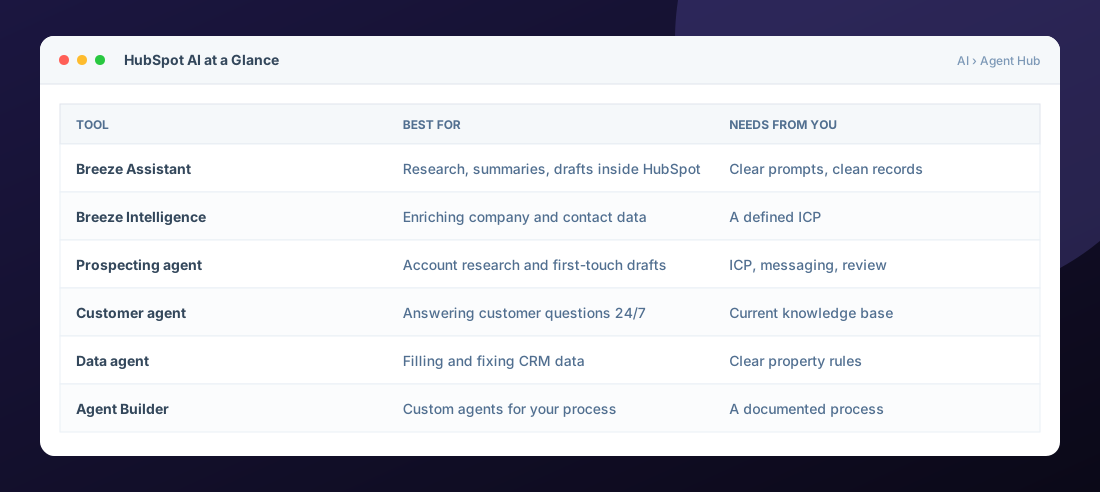
Breeze is the umbrella name for HubSpot's AI. In practice it comes in three forms:
- Breeze Assistant: an AI assistant inside HubSpot that can research, summarize records, draft emails and content, and help you get work done without leaving the CRM. See use Breeze Assistant.
- Breeze Intelligence: data enrichment that fills in company and contact details and helps you spot buying intent.
- AI agents: pre-built and custom agents that handle specific jobs like prospecting research, customer questions, and data cleanup.
What Is Agent Hub?
Agent Hub is where HubSpot's agents live. From there you can activate, configure, and monitor HubSpot-built agents and custom ones you create with Agent Builder. HubSpot's own guide, Understand Agent Hub, is the best place to check what is available on your account today, since the lineup keeps changing.
The Agents B2B Teams Use Most
Prospecting agent
Researches target accounts and contacts and drafts personalized outreach. Best when you already know your ideal customer and want reps spending time on conversations, not research.
Customer agent
Answers customer questions on chat and other channels using your knowledge base and site content, and hands off to a person when it should. It's only as accurate as the content you give it.
Data agent
Helps fill in and maintain CRM data. Useful, but it works best when your properties and rules are clearly defined.
How Pricing Works
Agent features depend on which hubs and tiers you have, and agent usage draws on HubSpot Credits. Before you roll anything out, check what's included in your subscription and estimate monthly usage so there are no surprises. We'd rather tell you a feature isn't worth the credits than turn it on for the sake of it.
Where to Start
- Fix the foundation. Duplicates, missing ownership, and unclear lifecycle stages make every AI output worse.
- Pick one job. For example, first-touch research for inbound leads, or answering the top 20 support questions.
- Set guardrails. Review before send, clear handoffs, and excluded audiences.
- Measure it. Meetings booked, resolution rate, or hours saved.
- Expand slowly. Add the next agent once the first one has earned it.
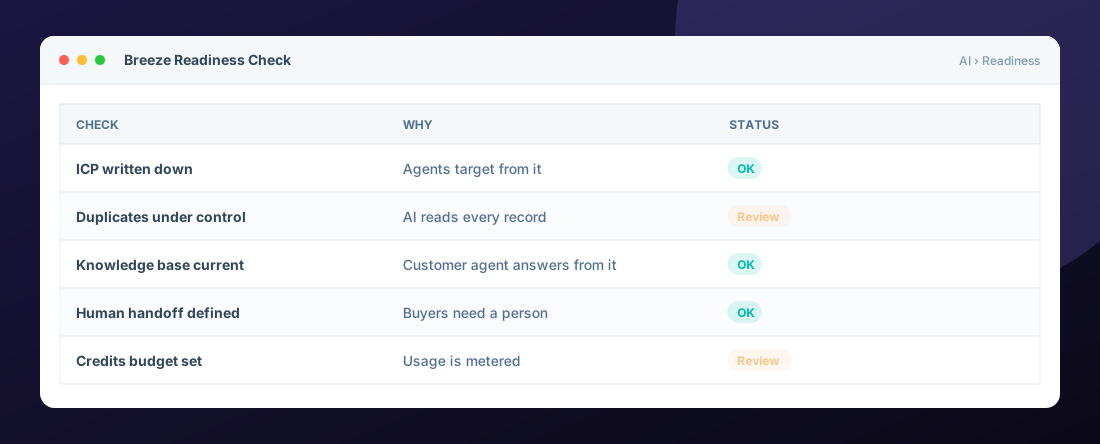
Our take: AI should arm your team, not replace it. The best Breeze rollouts we've seen give reps and support people their time back so they can focus on the conversations that close deals and keep customers.
Want a second opinion on your setup? Our free HubSpot audit includes an AI readiness check, or you can see how we implement automation and AI.
Frequently Asked Questions
Is HubSpot Breeze free?
Some Breeze features are included in HubSpot subscriptions, while agent usage typically draws on HubSpot Credits and some agents need specific hubs or tiers. Check your account and HubSpot pricing for current details.
What is the difference between Breeze and Agent Hub?
Breeze is the name for HubSpot AI overall. Agent Hub is the place in HubSpot where you manage AI agents, including activating, configuring, and monitoring them.
Will Breeze work with messy CRM data?
It will run, but results get worse as data quality drops. Cleaning duplicates, ownership, and key properties first gives AI much better inputs.
Which Breeze agent should we start with?
Start with the agent tied to your biggest bottleneck. For many B2B teams that is prospecting research or answering repeat customer questions.
Can a HubSpot partner set up Breeze for us?
Yes. A partner can check readiness, configure agents, set guardrails, and train your team so the rollout is measured and safe.
Helpful HubSpot Knowledge Base articles
Explore all 10 HubSpot services →

HubSpot Solutions Architect at Zentavra, a certified HubSpot Solutions Partner. Ten years and 200+ HubSpot builds for B2B sales, marketing, and service teams.