

In This Article
The short version
- Speed to lead is one of the easiest conversion wins in B2B. Minutes matter more than most teams think.
- Good routing has four parts: clean data, a score, a rotation with a fallback, and an alert that creates action.
- AI helps most at the scoring and context step, not by replacing the rep.
When a buyer fills out a demo form, they're usually comparing options that same day. The first team to respond with something useful often wins the conversation. Yet in a lot of portals we audit, inbound leads wait hours, sometimes days, for a first touch.
Here's how we set up lead routing in HubSpot so that doesn't happen.
Step 1: Clean the Data Before You Route on It
Routing by territory or company size only works if those fields are reliable. Use required form fields, the format data action, and enrichment to standardize country, state, employee count, and industry before routing decisions depend on them.
Step 2: Score the Lead
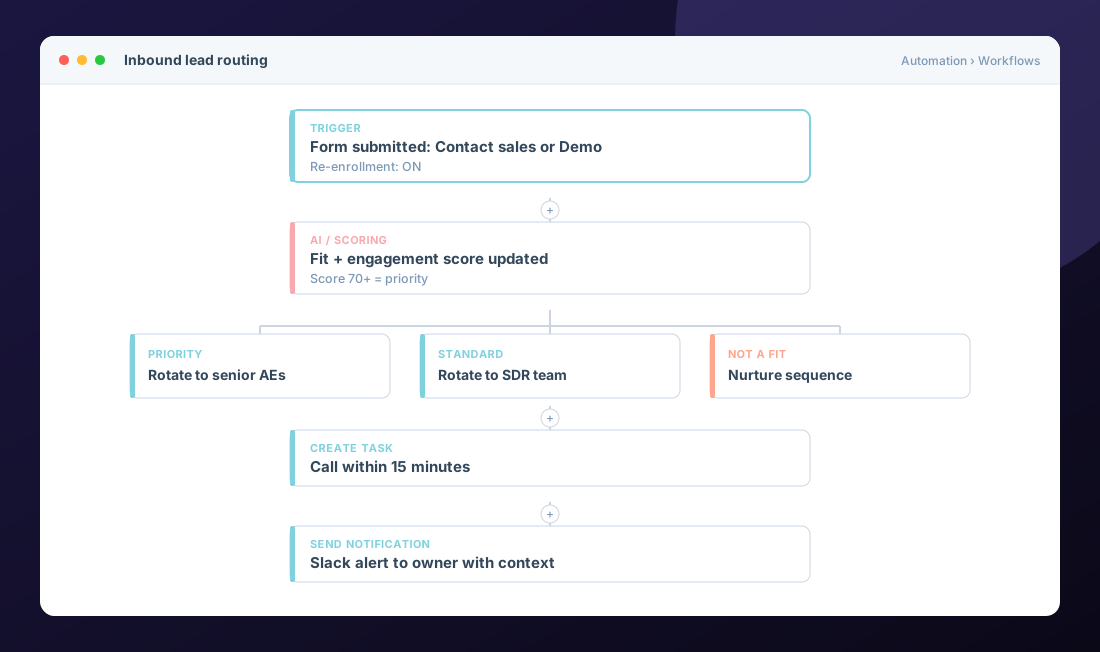
Not every lead deserves the same response. Combine fit (who they are) with engagement (what they did) using HubSpot's lead scoring tool. Keep it simple at first. Five fit rules and five engagement rules beat fifty you can't explain.
Step 3: Route with Rotation and a Fallback
Use rotate record to owner by team or territory. Always add a fallback branch. People go on vacation, leave, or get removed from teams, and an empty rotation means skipped leads.
Step 4: Create Action, Not Just a Notification
An email notification is easy to ignore. A high-priority task due in 15 minutes, plus an alert in Slack or Teams with the lead's context, gets a call made. Include what they asked for, their company, and their score so the rep can open with something relevant.
Step 5: Measure and Tighten
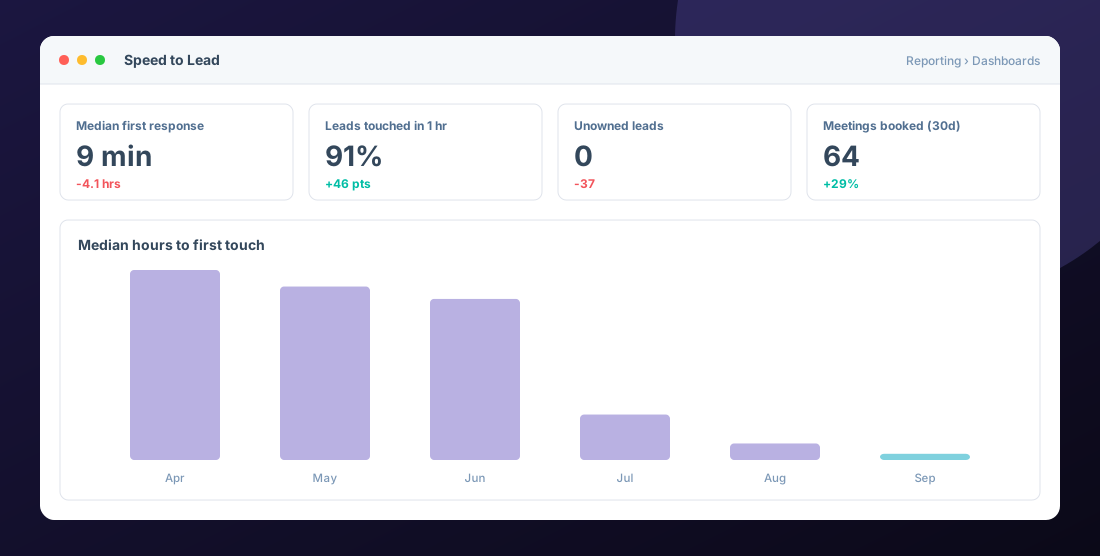
Track median time to first touch, percent of leads touched within an hour, and meetings booked. Review weekly for the first month.
Where AI Fits
AI is useful in routing when it improves the decision or the context: enriching missing company data, summarizing what a lead has done on your site, or flagging intent signals. HubSpot's AI agents can also help with research and first-touch drafts. The rep still owns the conversation. That's the point: arm your team, don't replace it.
Common mistake: routing on lifecycle stage changes without re-enrollment turned on. The first form fill routes fine. The second one, months later, goes nowhere.
Frequently Asked Questions
What is speed to lead?
The time between a prospect raising their hand, like submitting a demo form, and the first meaningful contact from your team.
Can HubSpot assign leads automatically?
Yes. Workflows can rotate records to owners across users or teams, set owners by territory using branches, and create follow-up tasks automatically.
What should happen if no rep is available?
Add a fallback branch that assigns the lead to a manager or a shared queue and sends an alert, so no lead sits unowned.
Should we use AI for lead routing?
Use AI to enrich data, score, and give reps context. Keep the routing rules themselves clear and documented so you can trust and adjust them.
Helpful HubSpot Knowledge Base articles
Explore all 10 HubSpot services →

HubSpot Solutions Architect at Zentavra, a certified HubSpot Solutions Partner. Ten years and 200+ HubSpot builds for B2B sales, marketing, and service teams.