


In This Article
The short version
- Most workflow problems come from settings, not missing features: re-enrollment, enrollment criteria, and suppression lists.
- Branches, goals, and the format data action let you do more with fewer workflows.
- Name, document, and review workflows monthly or they drift.
HubSpot workflows are the engine of most portals. They're also where the most hidden revenue leaks live. Here are eleven tricks we use in almost every build. None of them are flashy. All of them save hours or recover leads.
1. Turn on Re-enrollment on Purpose
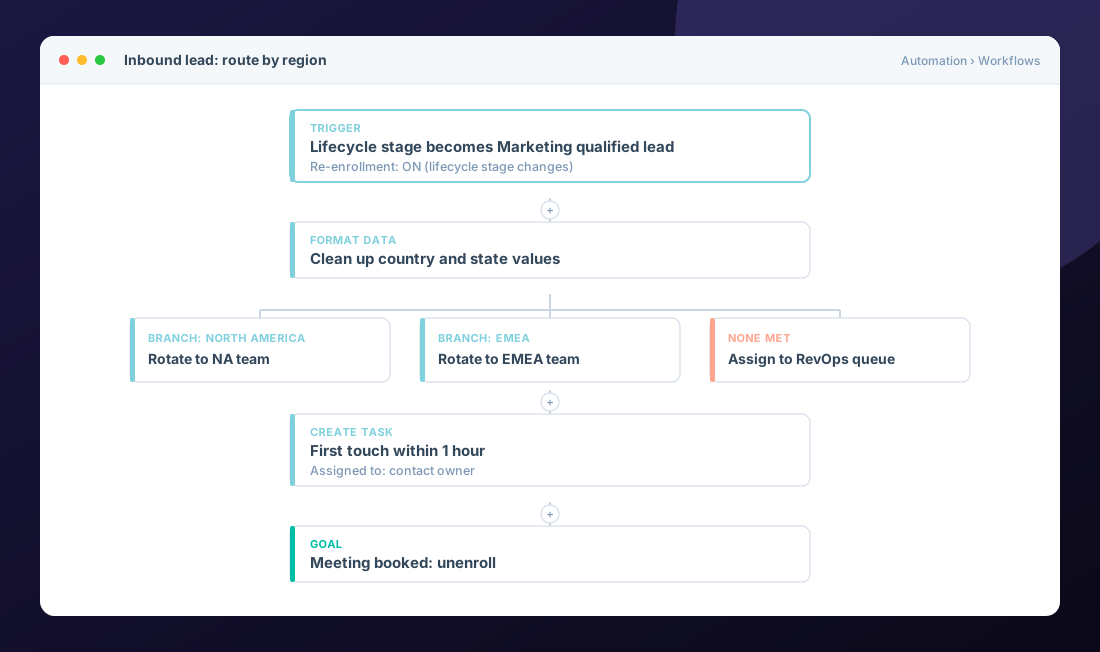
By default, a record goes through a workflow once. If your trigger is something that can happen again, like a lifecycle stage change or a new form submission, turn on re-enrollment for that specific trigger. Missed re-enrollment is the number one reason "the workflow stopped working."
2. Use One Workflow with Branches Instead of Five Copies
Value branches let you split by a single property, like region or product line. One workflow with clean branches is easier to maintain than five nearly identical ones that slowly drift apart.
3. Clean Data on the Way in with Format Data
The format data action can fix capitalization, trim spaces, and standardize values before routing or reporting depends on them. Garbage in your country field breaks territory routing quietly.
4. Rotate Owners with a Fallback
Rotating records to owners works great until someone leaves the team. Always add a fallback branch that assigns to a queue or a manager so no lead sits unowned.
5. Set Goals So People Exit When the Job Is Done
A goal (like "meeting booked") unenrolls records as soon as they hit it. That stops follow-up emails from landing after someone already bought.
6. Use Business-day Delays
"Wait 1 day" on a Friday means Saturday. Delay until a specific day or time, or use business-day logic, so tasks and emails land when people are working.
7. Create Tasks, Not Just Emails
Automation shouldn't replace your reps. A task that says "call within 15 minutes" with the right context does more for conversion than another automated email.
8. Send Internal Alerts to Where People Work
Use internal notifications or Slack for hot moments: a demo request from a target account, a pricing page visit, or a deal stuck too long. Reps ignore what they have to go look for.
9. Suppress the Right People
Add suppression lists for customers, competitors, and open deals so nurture emails don't reach people in an active sales conversation.
10. Name Workflows Like a Librarian
Use a convention like [Team] Object: purpose, for example [Sales] Contact: demo request routing. Six months from now someone will thank you.
11. Review Errors Every Month
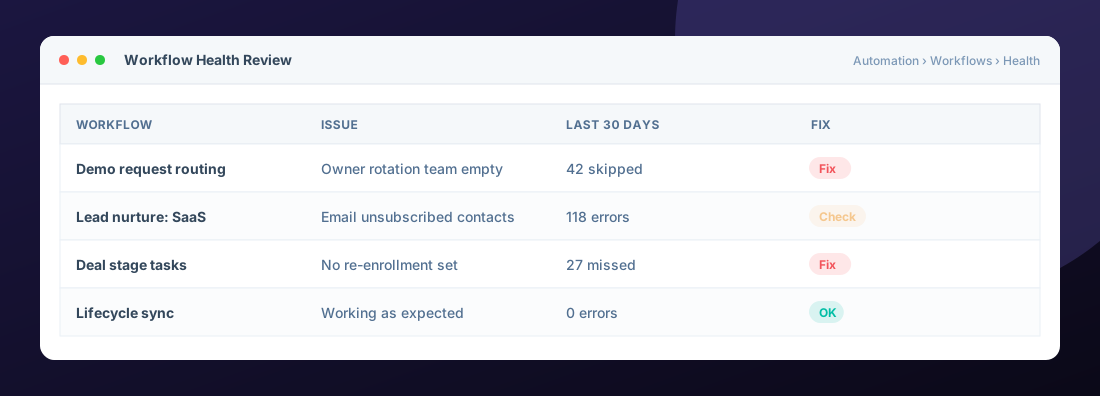
Workflows fail silently. Check the history and errors tab on your key workflows monthly. One empty rotation team can skip dozens of leads before anyone notices.
Before you build: write the process on paper first. Trigger, who owns it, what happens, and when it ends. If you can't write it in five lines, the workflow will be messy too.
Frequently Asked Questions
How many workflows is too many?
There is no fixed number, but if several workflows do almost the same thing, or nobody can explain what one does, consolidate. Fewer, well-named workflows are easier to trust.
Why did my workflow stop enrolling records?
Common causes are re-enrollment being off, enrollment criteria that no longer match, a paused workflow, or records already enrolled. Check the enrollment history first.
Can workflows assign leads to sales reps automatically?
Yes. The rotate record to owner action assigns records across users or teams. Add a fallback for when a rotation team is empty.
Which HubSpot tier do I need for workflows?
Workflows are available on Professional and Enterprise tiers of most hubs. Some actions, like custom code, need specific hubs or tiers.
Helpful HubSpot Knowledge Base articles
Explore all 10 HubSpot services →

HubSpot Solutions Architect at Zentavra, a certified HubSpot Solutions Partner. Ten years and 200+ HubSpot builds for B2B sales, marketing, and service teams.